6 Best Page Monitor Extension Alternatives in 2026
The best Page Monitor alternatives in 2026 for checks that keep running with Chrome closed: AyeWatch, Distill, Visualping, changedetection.io and more.
By AyeWatch Team8 min read

Page Monitor is a free Chrome extension: pick an element, set an interval, get a notification when it changes. It only works while your browser is open, so restocks, grade postings and policy changes that land overnight wait until you open Chrome again.
It also has no email or chat alerts, so the notice only reaches you at that one computer. The tools below keep checking when the lid is shut.
Quick comparison: best Page Monitor alternatives
| Product | Best for | Starting price | Key difference | Review |
|---|---|---|---|---|
| AyeWatch | Cloud page alerts that reach your phone | Free Preview, then $9/mo | Runs in the cloud, alerts on phone | Read |
| Distill | Element-level checks run from your browser | $15/mo | Extension plus cloud, 25 free monitors | Read |
| Visualping | Simple visual page alerts for non-technical users | $14/mo ($10/mo billed annually) | Hosted screenshot diffs with summaries | Read |
| changedetection.io | Self-hosters who want open-source control | $8.99/mo hosted | Self-host free, browser steps for logins | Read |
| Wachete | Low-cost monitoring of pages behind logins | About $5/mo | Cheap cloud checks, handles logins | Read |
| FollowThatPage | Basic emailed page-change alerts | Free | Free emailed change alerts | Read |
Starting prices are the lowest paid plan listed on each vendor's site, checked October 2026.
Best overall alternative
1. AyeWatch
AyeWatch is an AI internet monitor. Paste a URL, write what counts as a change in plain English, and it checks the page in the cloud and alerts you with a short summary, whether or not your computer is on.
Best for: Cloud page alerts that reach your phone.
- No browser required. Checks keep running when Chrome is closed or the laptop is asleep.
- Plain-English rules instead of element picking. "Tell me when size M is back in stock" is the whole setup.
- Push to iOS and Android, plus email, Slack, Discord and webhooks.
- Topics too. Monitor news or Reddit for a subject that will not live on one page.
Pricing: Free Preview with no card. Pro is $9/mo with hourly monitoring. Pro+ is $19/mo and unlocks ASAP mode.
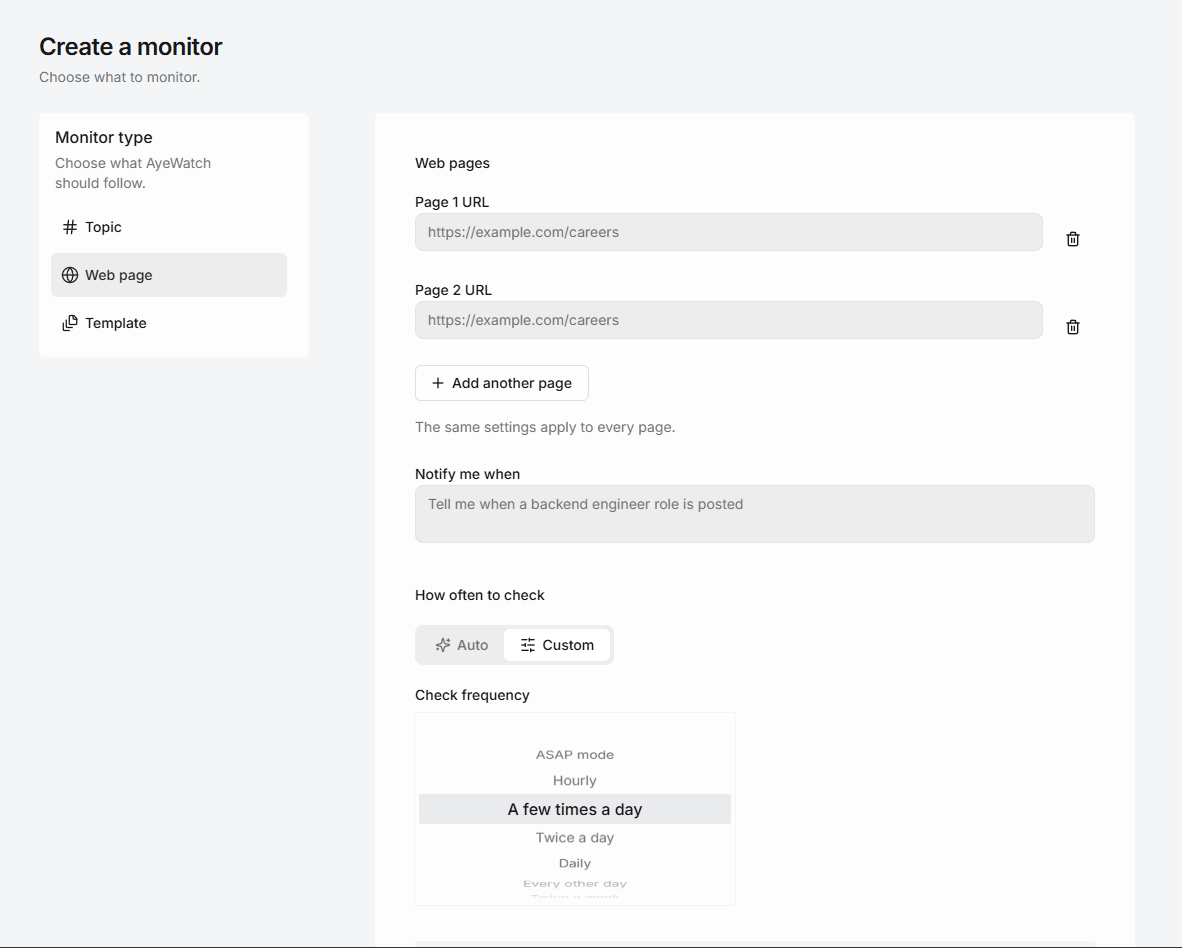
Try AyeWatch as your Page Monitor alternative
Describe a topic, paste a URL or monitor social media. Free Preview, no card.
Start free →Why teams choose AyeWatch
- Checks run on AyeWatch servers. Hourly on Pro, ASAP mode on Pro+.
- Alerts follow you. Push notifications on the native iOS and Android apps, not only a desktop popup.
- Layout changes stay quiet. Changes are judged by meaning, so a redesigned header does not trigger an alert.
Monitor: "Product page at https://example.com/jacket"
Rule: "Alert me when the medium size is back in stock or the price drops below $150."
AyeWatch vs Page Monitor
| Feature | AyeWatch | Page Monitor |
|---|---|---|
| Starting price | Free Preview, then $9/mo | Free |
| Runs with the browser closed | Yes, in the cloud | No |
| Alerts | Push, email, Slack, Discord, webhooks | In-browser notifications |
| How changes are set | Plain-English rule | Pick an element |
| Where data lives | AyeWatch servers | Your device |
| Topics beyond one page | Yes | No |
When Page Monitor is still the better pick: If you want a free, private check on a page you have open all day anyway, Page Monitor is hard to beat: no account, and data never leaves your device. AyeWatch needs an account and runs the checks on its own servers.
Best free alternative
2. Distill
Distill monitors pages from a browser extension or its cloud, with condition-based alerts on the page elements you select. The natural step up: the same element picking, with cloud checks when your browser is closed.
Best for: Element-level checks run from your browser.
Strengths
- Generous free plan
- Fine-grained element selection and conditions
- Local checks are free
Weaknesses
- Local monitors need your browser open
- Free cloud checks run every 6 hours
- Setup is more technical than most
Pricing: $15/mo (Free plan (25 monitors)).
Pick it if you want element-level conditions and cheap local checks.
Best for visual diffs
3. Visualping
Visualping checks pages on a schedule and alerts you to visual, text or element changes, with AI change summaries.
Best for: Simple visual page alerts for non-technical users.
Strengths
- Free plan includes AI summaries
- Visual, text and element comparison
- Slack, Teams and Sheets integrations
Weaknesses
- Check-based pricing climbs quickly with volume
- Free plan checks hourly at best
- Slack and Teams need Business plans
Pricing: $14/mo ($10/mo billed annually) (Free plan (5 pages)).
Pick it if you want a polished, mainstream tool with visual diffs and a usable free tier.
Best open-source option
4. changedetection.io
changedetection.io is an open-source page change detector you can host yourself, or rent hosted with a real Chrome browser. It supports CSS and XPath targeting and browser steps for logins.
Best for: Self-hosters who want open-source control.
Strengths
- Free and open source to self-host
- Browser steps for logins and clicks
- 85+ notification channels
Weaknesses
- Self-hosting means you maintain it
- Text and selector rules, not meaning
- Utilitarian interface
Pricing: $8.99/mo hosted (Free to self-host).
Pick it if you want full control, or a cheap hosted option.
5. Wachete
Wachete monitors whole pages or selected sections and sends email, push or chat alerts, keeping up to 12 months of history.
Best for: Low-cost monitoring of pages behind logins.
Strengths
- Low prices and a free-forever plan
- Handles login-protected and dynamic pages
- Apps and browser extensions
Weaknesses
- Free plan checks once a day
- Keyword and section rules, not meaning
- Dated interface
Pricing: About $5/mo (Free plan).
Pick it if you want an inexpensive page monitor that handles logins.
6. FollowThatPage
FollowThatPage emails you when a page you register changes. It is a long-running, minimal service.
Best for: Basic emailed page-change alerts.
Strengths
- Free to start
- Simple email workflow
- No setup beyond a URL
Weaknesses
- Basic features and a dated feel
- No summaries or chat delivery
- Any text change can trigger an email
Pricing: Free (Free plan).
Pick it if you only need basic emailed page-change alerts.
FAQ
What is the best Page Monitor alternative?
For cloud checks with alerts on your phone, AyeWatch. For element picking with cloud checks, Distill. For a free self-hosted option, changedetection.io.
Is there a free Page Monitor alternative?
Yes. Distill has a free plan with cloud checks, changedetection.io is free to self-host, FollowThatPage and Wachete have free plans, and AyeWatch has a Free Preview with no card.
Why does Page Monitor miss changes?
Page Monitor runs inside Chrome, so it only checks while the browser is open. If a change happens while your computer is off or asleep, you only hear about it after you reopen Chrome.
How do I switch from Page Monitor to AyeWatch?
Open each page you track in Page Monitor, paste its URL into an AyeWatch webpage monitor, and describe the element you were tracking in plain English, such as 'the price' or 'the stock status'.
Which tool is right for you?
- You want alerts on your phone while your laptop is off: AyeWatch.
- You like picking elements and want free cloud checks: Distill.
- You want a visual record of what changed: Visualping.
- You have a server and want full control: changedetection.io.
- You only need a basic email when a page changes: FollowThatPage.
Monitor what matters without the noise
Set up your first monitor in under a minute. Free Preview, no card.
Get started today →